How to Create Three Frame Photos Using Gemini

Three frame photos are everywhere on Instagram right now. You know the ones I’m talking about. A vertical image split into three different shots stacked on top of each other, each showing a different angle or moment. They look polished, cinematic, and professional. You can create them in minutes using Google Gemini.
I started noticing these photos a few months ago. At first, I thought they were shot with multiple cameras or edited with some complicated software. Turns out, you can make them pretty easily with the right tool and a solid prompt. I’ve been experimenting with Gemini’s image generation capabilities, and I want to share exactly how I do it.
Get Started with Gemini
Head over to gemini.google.com and start a new chat. This is your blank canvas. Before you write any prompt, you need to pick the right model. Set “Thinking with 3 Pro” as your model. This one works best for creative image generation because it takes time to think through what you’re asking for.
Once your model is selected, attach a photo. You can use an existing photo of yourself or someone else, or describe what you want to create from scratch. Attaching a reference image helps Gemini understand the style and quality you’re aiming for.
The Prompt Template
This is the core of the whole process. I use this template every time:
Create a 9:16 vertical cinematic photo divided into 3 stacked frames, featuring [subject with details].
-Top frame: [first frame details]
-Middle frame: [second frame details]
-Bottom frame: [third frame details]
Let me break this down so you understand what each part does.
Understand Each Element
The 9:16 ratio tells Gemini exactly how tall and wide your image should be. This ratio is perfect for Instagram because it fills the screen vertically. It’s the standard for this type of content.
Vertical cinematic photo sets the tone. You’re asking for something that looks like it came from a movie, not a casual snapshot. This tells Gemini to add proper lighting, professional framing, and high contrast.
Divided into 3 stacked frames is the key instruction. This tells Gemini you want three separate moments or shots stacked on top of each other, not one image with three people or elements.
The subject with details is where you describe who or what your photo is about. Be specific. Include clothing, attitude, age, environment, or anything that helps paint a picture. “A person” is too vague. “A stylish young man in his late 20s wearing a black leather jacket with a sharp haircut and confident attitude” is much better.
Top frame, middle frame, bottom frame each get their own instruction. This is where you control the story flow. Think about how a director would shoot a scene. Start with something tight and personal, move to a medium shot, then pull back for the full-body view. Or mix it up however you want.
Real Examples That Work
Let me show you three examples I’ve used successfully. These follow the template exactly.
Example 1: The Urban Guy
Create a 9:16 vertical cinematic photo divided into 3 stacked frames, featuring a stylish young man in his late 20s wearing a black leather jacket, sharp haircut, and confident attitude.
-Top frame: Close-up of his face with intense eye contact, soft side lighting, shallow depth of field, blurred city lights in the background.
-Middle frame: Medium shot showing his upper body leaning against a brick wall, hands in pockets, neon street lights reflecting on the jacket.
-Bottom frame: Full-body shot of him walking down an empty urban street at night, wet road reflections, moody cinematic lighting.
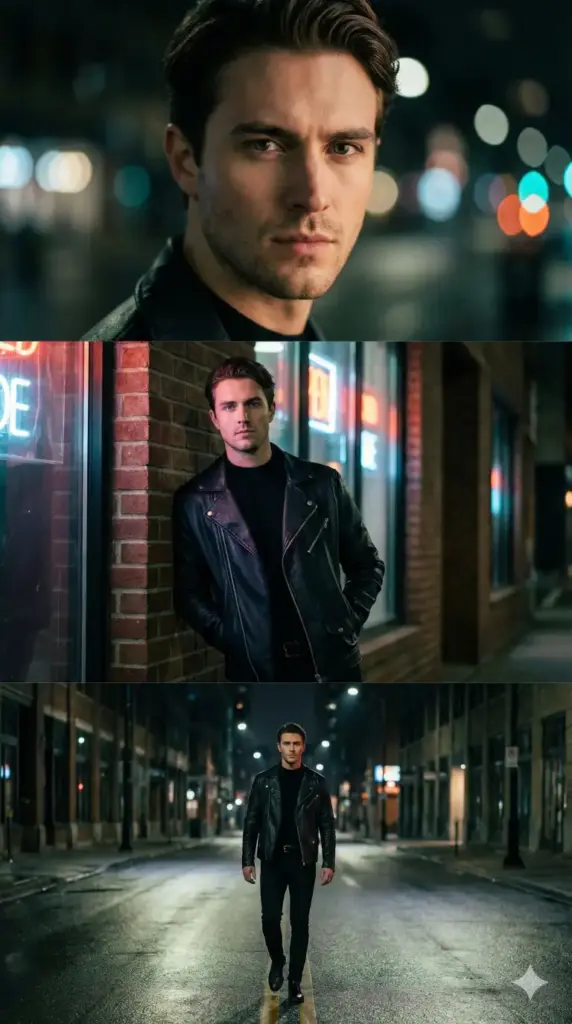
This one works great because it tells a visual story. You see the face first, then the attitude, then the action. Each frame builds on the last.
Example 2: The Fitness Focus
Create a 9:16 vertical cinematic photo divided into 3 stacked frames, featuring a fitness-focused woman wearing activewear in a gym environment.
-Top frame: Close-up of her focused expression with sweat details, dramatic top lighting.
-Middle frame: Medium shot of her gripping dumbbells, muscles engaged, gym equipment blurred in background.
-Bottom frame: Full-body shot of her performing a powerful workout pose, strong shadows, cinematic contrast.
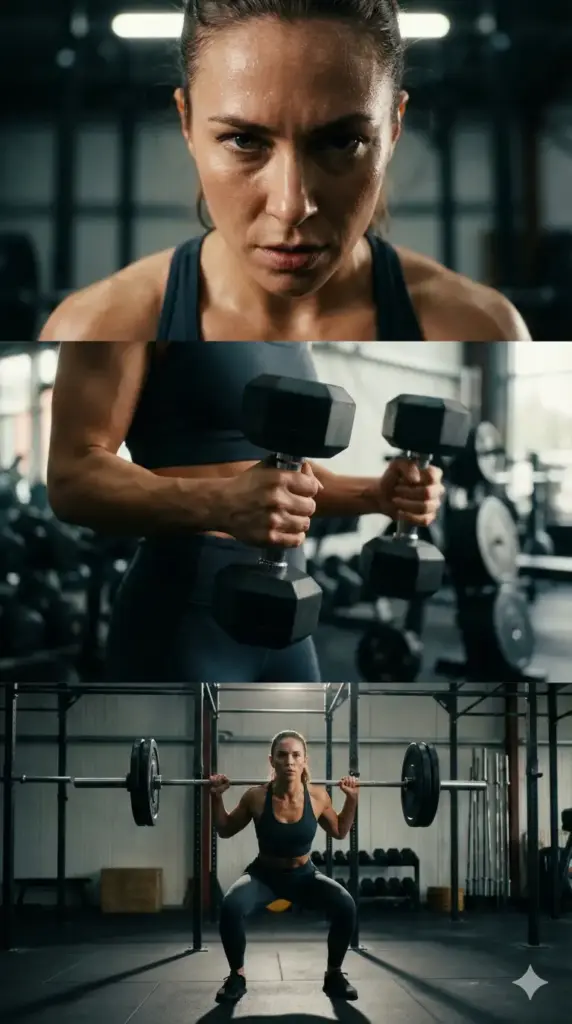
This approach works well when you want to show action or progression. Gemini picks up on the intensity in each frame and makes the whole piece feel energetic.
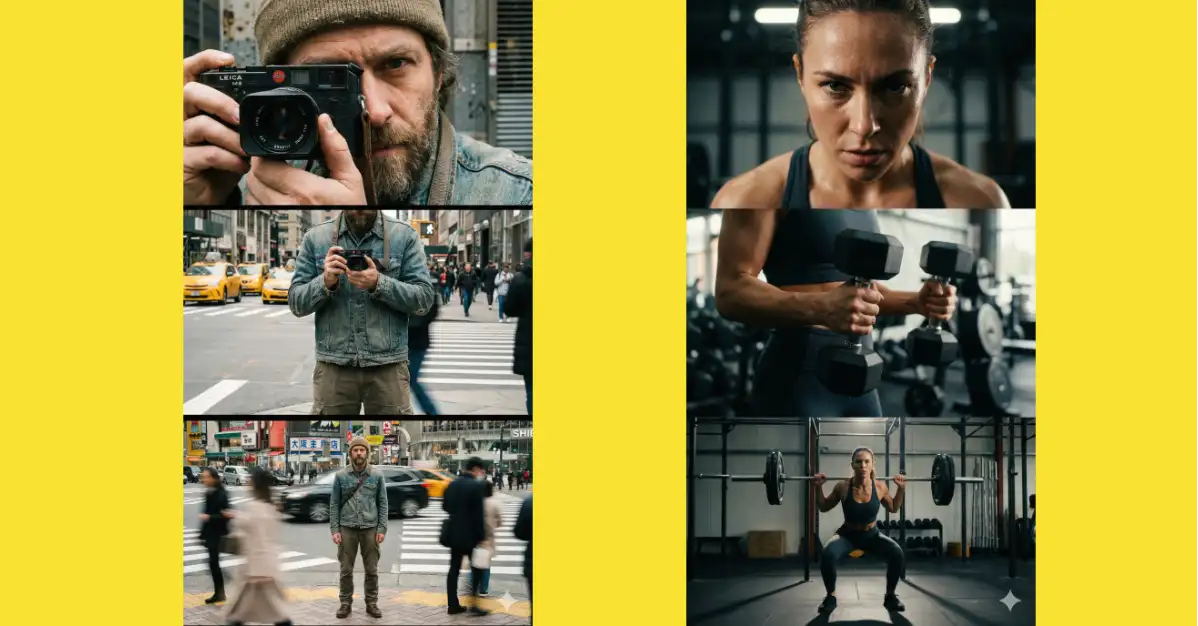
Example 3: The Photographer
Create a 9:16 vertical cinematic photo divided into 3 stacked frames, featuring a street photographer wearing casual urban clothing.
-Top frame: Close-up of his face partially hidden behind a camera, focused expression.
-Middle frame: Medium shot of him holding the camera ready to shoot, city street blurred behind.
-Bottom frame: Full-body shot of him standing at a busy crosswalk, motion blur from people passing.

Notice how each example starts tight and zooms out? That’s the pattern that tends to work best.
Tips for Better Results
Be detailed in your descriptions. The more information you give Gemini, the better it understands what you want. Don’t just say “a person.” Say what they’re wearing, their age range, their mood, their environment.
Think about your lighting. Mention specific lighting setups in each frame. “Soft side lighting” or “neon street lights” or “dramatic top lighting” make a real difference in how Gemini renders your image.
Use action words. Instead of just describing static poses, describe what the person is doing. “Leaning against a wall” or “gripping dumbbells” or “walking down a street” gives the image life.
Create a visual story. Each frame should feel connected but show something new. Move from close to wide. Move from one emotion to another. Make the viewer want to follow from top to bottom.
The Results
When you run this prompt with Thinking with 3 Pro, Gemini generates a single vertical image that looks like three stacked photos. The quality is clean and professional. The three sections feel cohesive even though they show different moments.
I’ve used these images on Instagram and they get good engagement. People notice the effort and creativity. They’re shareworthy and they stand out in a feed of standard photos.
Three frame photos used to seem like something that required fancy equipment or advanced editing skills. Now you can create them with a text prompt and a few minutes of your time. Gemini has made this accessible to anyone.
If you haven’t tried it yet, I’d give it a shot. Start with one of the examples I shared, modify it to fit something you’re interested in, and see what Gemini creates. You might be surprised at how good the results are. Once you get one you like, you can post it and join the trend.