How to Do the ChatGPT Caricature Trend

If you’ve been scrolling through social media lately, you’ve probably come across those fun, exaggerated cartoon-style portraits people keep sharing. That’s the ChatGPT caricature trend, and honestly, it’s one of the more entertaining things AI image generation has produced in a while.
People are posting these all over Instagram, TikTok, and X. Some look hilarious. Some look impressively detailed. They actually capture the person’s personality and job in a way that feels weirdly accurate.
The idea behind it is simple: you upload a photo of yourself, and ChatGPT turns it into a caricature that exaggerates your features in a fun, stylized way.
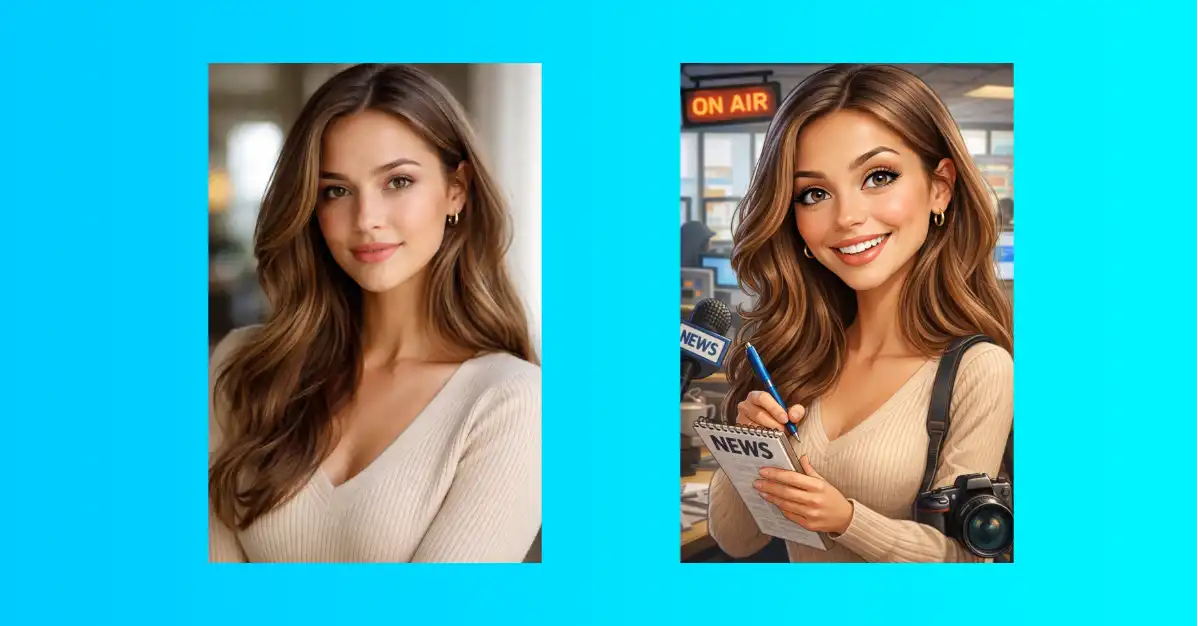
What makes it stand out from other AI photo trends is that it doesn’t just draw a cartoon version of your face. It also tries to show what you do for a living, adding props, outfits, and visual details that tie back to your profession.
That personal touch is what’s making people stop and look twice.
What You’ll Need Before You Start
You don’t need anything fancy. Just make sure you have:
- A ChatGPT account (free works, but Plus gives you faster results)
- A clear portrait photo of yourself or whoever you want to turn into a caricature
- A front-facing shot with decent lighting works best
That’s it. No special settings, no complicated setup.
How to Do the ChatGPT Caricature Trend (Step by Step)
Here’s exactly how to try it.
Step 1: Open ChatGPT
Head to chatgpt.com on your browser or open the ChatGPT app on your phone. Either works fine.
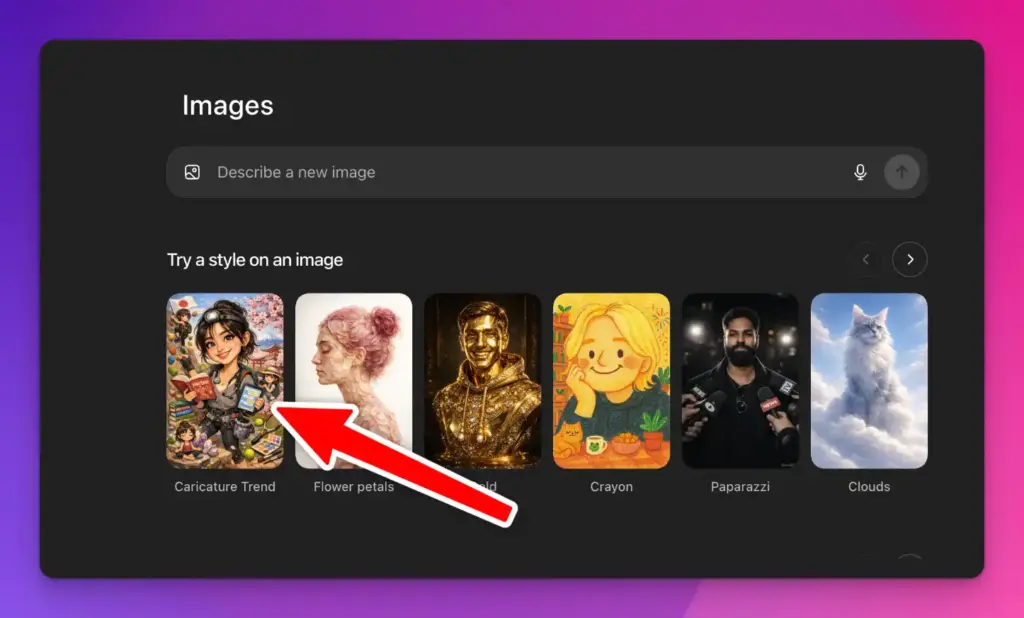
Step 2: Go to the Images Section
Once you’re in, click on the menu icon. From the options that appear, select Images.
Step 3: Find the Caricature Trend
Scroll down through the available options. You’ll see a section called “Caricature Trend”. Click on it to open it.
Step 4: Upload Your Photo
ChatGPT will prompt you to upload a photo. Click on “Choose a new photo” and select a portrait photo from your device.
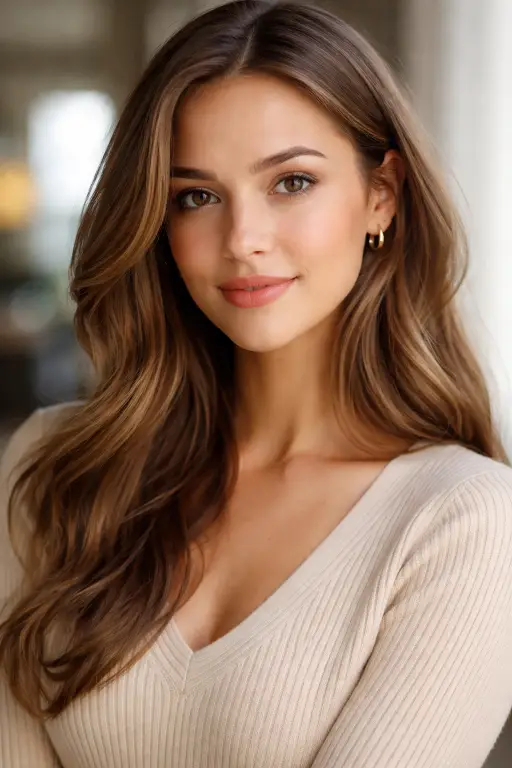
For my test, I used a portrait photo of a woman. A clear, well-lit face shot gave the best result. Avoid group photos or images where your face is small or partially hidden.
Step 5: Let It Generate
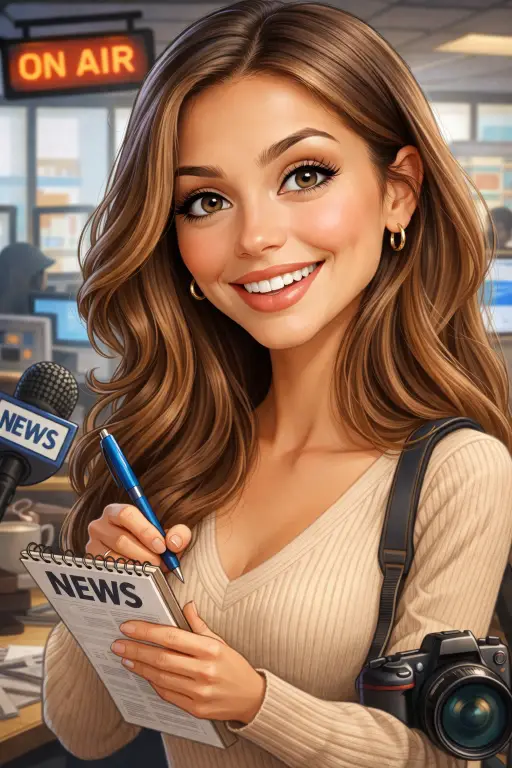
Once the photo is uploaded, the generation starts automatically. You don’t need to type a single word. Just sit back and wait. It usually takes anywhere from a few seconds to about half a minute depending on how busy the servers are.
When it’s done, your caricature will appear on screen, ready to save and share.
The Prompt Running in the Background
Here’s something most people don’t notice: even though you’re not typing a prompt, ChatGPT is still using one behind the scenes.
The prompt it runs automatically is:
Create a caricature of me and my job based on everything you know about me.
This is actually a well-thought-out prompt. Let me break it down.
“Create a caricature of me” is the core instruction. A caricature isn’t just a cartoon. It’s a style that purposely exaggerates certain features, like a wide smile, big eyes, or a prominent jawline, to create something that’s recognizable but playful. Street artists have been doing this for centuries. ChatGPT is applying the same concept digitally.
“and my job” is what makes this trend different from a regular AI portrait. ChatGPT attempts to include your profession in the image. If it already has context about what you do, it will add visual details that represent your work. A teacher might appear in front of a chalkboard. A photographer might be shown holding a camera. A chef gets an apron and a pan.
“based on everything you know about me” is the most interesting part. This tells ChatGPT to pull from any prior information it has about you. If you’ve had conversations with ChatGPT where you mentioned your job, your interests, or your background, it may incorporate that into the image.
The result is something that feels surprisingly personal for a generated image.
What If ChatGPT Doesn’t Know Your Job?
This is the most common issue people run into. If ChatGPT doesn’t have any context about what you do, the caricature will still look great but it’ll be missing that job-specific detail.
The fix is easy. Instead of letting it run automatically, type a custom prompt before generating. Something like:
Create a caricature of me as a [your job] based on the photo I uploaded.
Here are some examples to give you an idea:
- “Create a caricature of me as a software engineer based on the photo I uploaded.”
- “Create a caricature of me as a nurse based on the photo I uploaded.”
- “Create a caricature of me as a personal trainer based on the photo I uploaded.”
You can go even further and add extra details. If you want to include a specific background, a particular style, or any other visual detail, just add it to the prompt:
Create a caricature of me as a chef. I want it in a warm, vibrant cartoon style with me holding a pan in a busy kitchen.
The more specific you are, the more the image will reflect what you’re picturing.
How to Apply and Share the Caricature Trend
Once your caricature is ready, there are quite a few ways to use it.
Post it on social media. This is the obvious one. Save the image and share it on Instagram, TikTok, X, or wherever you’re most active. Add a caption about the trend and tag it so others can find it. A lot of people are doing side-by-side comparisons of their real photo and the caricature, which tends to get good engagement.
Use it as a profile picture. The caricature style gives you a creative, eye-catching avatar that still looks like you. It works especially well for Twitter/X and LinkedIn if you want something a little more playful than a standard headshot.
Make one for a friend or family member. Upload someone else’s photo and generate a caricature as a fun gift or just to share with them. Most people get a kick out of seeing an AI version of themselves, especially when the job detail is accurate.
Create multiple versions. Try generating a few caricatures using different job descriptions or art styles. You can end up with a whole set of “alternate universe” versions of yourself. It’s a fun creative exercise, and the results are often surprising.
Use it for content creation. If you’re a blogger, YouTuber, or social media creator, a caricature can work well as a thumbnail, a branded avatar, or a fun element in your content. It has a personality that a regular photo sometimes doesn’t.
The ChatGPT caricature trend is one of those things that’s simple to do but genuinely fun to see. It only takes a couple of minutes, the steps are straightforward, and the results are good enough to actually share.
Whether you’re doing it for fun, for content, or just out of curiosity, give it a go. You might be surprised at how well it captures you.