Turn Any Photo Into a Sarcastic 90s Cartoon With This ChatGPT Prompt

Get our stories first in Google Search
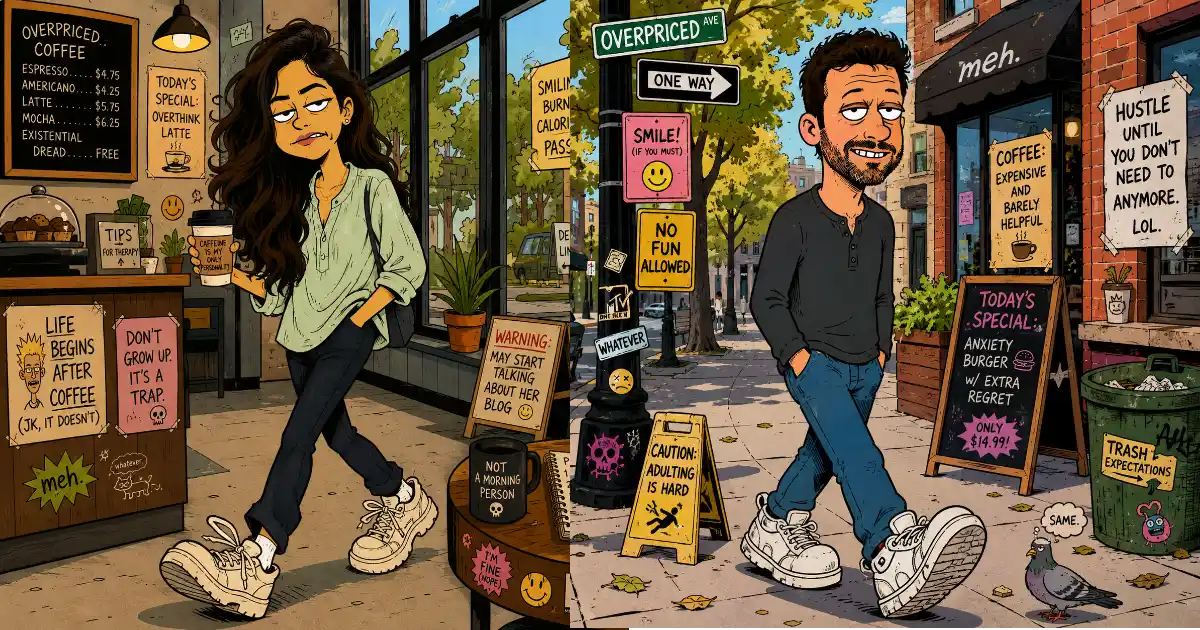
I found a style recently that I can’t stop laughing at. You upload a normal photo to ChatGPT, and it turns you into a lanky, deadpan 90s cartoon character, the kind you’d see in classic MTV animation, surrounded by sarcastic signs like “Sun. Salt. Regret.” and “Life’s a Wave. Catch It or Whatever.”
One well-written prompt handles all of it, because it tells ChatGPT to build the scene around whatever background your photo already has.
In this post, I’ll give you that exact prompt, explain how to use it, and show you a few small tweaks to get different moods out of it.
What This Style Actually Is
Before the prompt, it helps to know what makes this look work, because that’s how you’ll know if your result is right or needs a retry.
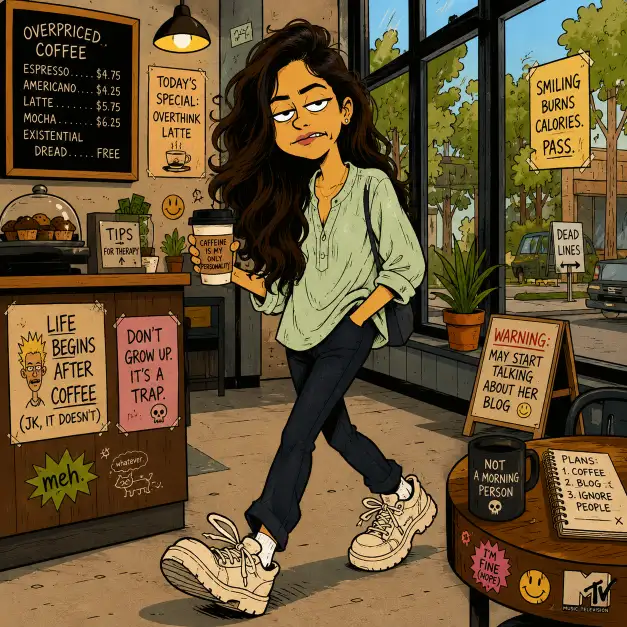
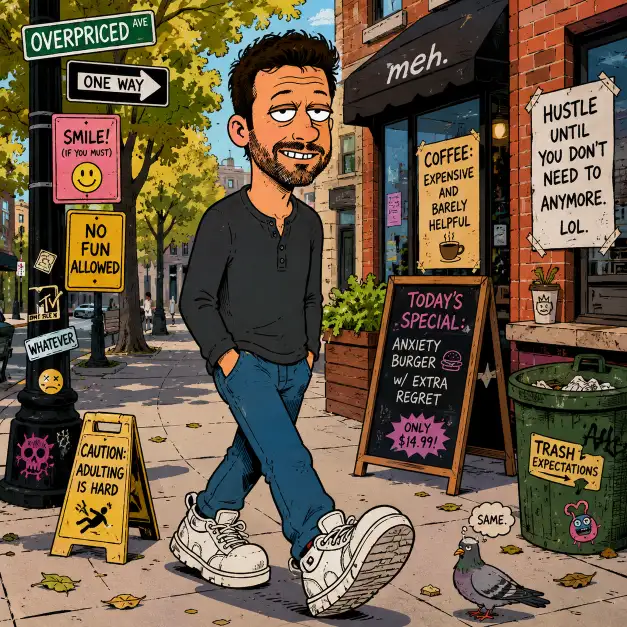
The style borrows from 90s alternative cartoons. Think bold black outlines, flat retro colors, exaggerated skinny bodies, oversized sneakers, slightly crooked teeth, and a bored expression with half-closed eyes. Nobody in these cartoons is impressed by anything, and that’s the whole joke.
The second ingredient is the environment. The scenes are filled with hand-lettered signs, posters, and stickers carrying dry, ironic humor. A beach snack stand labeled “Overpriced & Underwhelming”. A drink cup that just says “MEH”. A tip sign reading “Tips Feed the Beat”. The character is funny, but the signs are what make people zoom in and share the image.
How to Use the Prompt
Open ChatGPT and start a new conversation. Upload the photo you want to convert. Any photo works, but full-body or half-body shots give the best results because the exaggerated proportions need room to show.
Then paste the prompt below and send it. That’s it. ChatGPT reads the photo, keeps your clothing, hairstyle, and setting, and redraws everything in cartoon form.
The Prompt
Copy this exactly as written:
Create a 90s alternative cartoon style illustration of the person in this photo, inspired by classic MTV animation. Exaggerate the character with a lanky body, oversized sneakers, slightly crooked teeth, and a bored deadpan expression with half-closed eyes. Keep their real clothing style, hairstyle, and accessories but redraw everything in bold outlines with flat retro colors. Place the character mid-walk in a scene that matches the photo background, and fill the environment with sarcastic hand-lettered signs and ironic slogans related to the setting, like funny menu boards, deadpan motivational posters, and absurd warning signs. Add small humorous details like stickers, doodles, and graffiti. Bright daytime lighting, clean cartoon shading, square format. Use aspect ratio 1:1.
Following are some results I got.
Why This Prompt Works on Any Photo
The trick is in one line: “a scene that matches the photo background”. Instead of forcing a fixed location, the prompt tells ChatGPT to look at where your photo was taken and build the jokes around that place.
Upload a beach photo and you’ll get boardwalk signs about sunburn and overpriced ice cream. Upload an office photo and you’ll get motivational posters that have given up on motivating anyone. Upload a gym selfie and the signage will roast your workout. The humor adapts automatically.
The other line doing heavy lifting is “keep their real clothing style, hairstyle, and accessories”. This is what makes the result recognizable. Without it, you get a generic cartoon person. With it, your friends immediately know the sad cartoon character is you, and that’s the moment the image becomes shareable.
Small Tweaks for Different Results
The base prompt gives you the classic deadpan version. Here are a few one-line additions I’ve tested that change the flavor without breaking the style.
If the sarcastic signs come out generic or bland, add this line at the end: “The signs should have dry, ironic humor, for example ‘Sun. Salt. Regret.’ or ‘Good Vibes Only (Terms Apply)’.” Giving the model two examples of the humor you want pushes every sign in that direction.
If the face doesn’t look like you, add: “Keep the person’s recognizable features like glasses, beard, and hair color.” ChatGPT sometimes smooths out the details that matter most, and this line pulls them back.
If you want a different mood, swap “bored deadpan expression” for “smug grin” or “mildly annoyed expression”. Small change, completely different character energy.
If you’re converting a group photo, change “the person” to “the people” and add “give each person a distinct exaggerated cartoon body type”. Group versions are honestly even funnier because everyone gets roasted equally.
A Few Things I Learned From Testing
The more ordinary your original photo, the funnier the cartoon. A boring photo of you holding a coffee cup in a parking lot becomes comedy gold once the parking lot sign reads something ridiculous. Dramatic, posed photos actually work worse because the deadpan style clashes with them.
Daylight photos convert better than night shots. The style depends on flat, bright colors, and dark photos push the model toward muddier results.
If the text on the signs comes out misspelled, just reply with “fix the spelling on the signs, keep everything else the same”. ChatGPT handles text corrections well when you ask for that one change instead of regenerating from scratch.
And if a result feels too tame, tell it “make the signs more sarcastic”. You’d be surprised how much further it’s willing to go.
Try It On Your Most Boring Photo
That’s the whole method. One prompt, any photo, and a cartoon version of yourself that looks thoroughly unimpressed with life.
Start with the most normal photo in your camera roll, the one you’d never post anywhere. Those make the best conversions, and they’re the ones that get the biggest laughs when you share them.