How to Make Birthday Letter Photos in ChatGPT

Get our stories first in Google Search
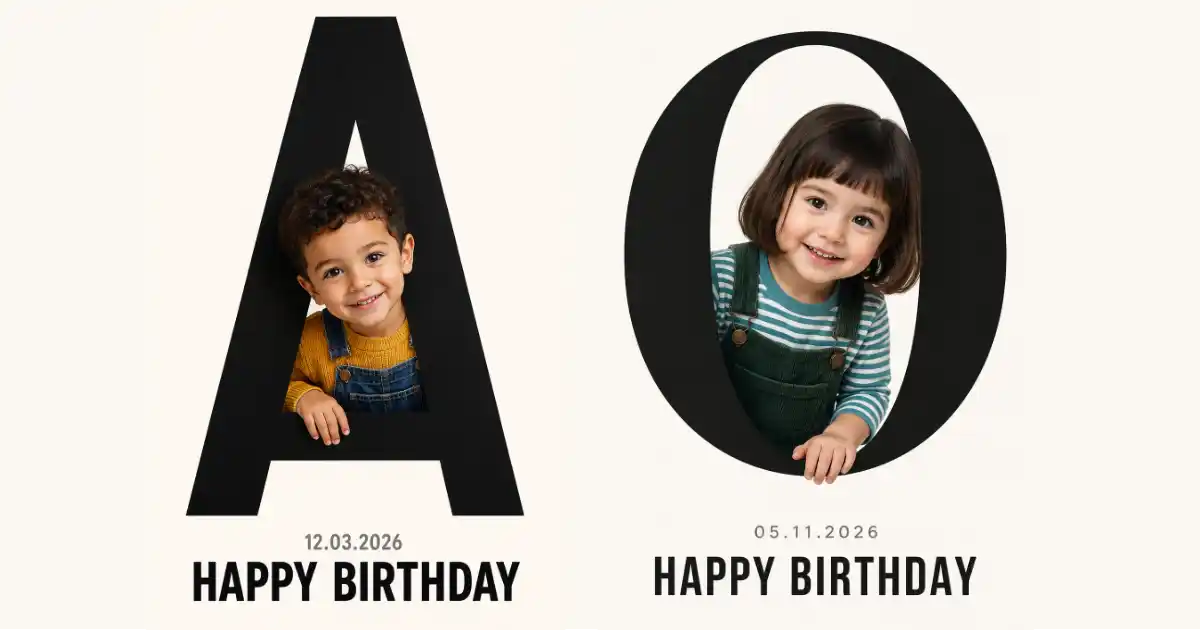
I saw one of these birthday cards floating around and couldn’t stop looking at it. A giant black letter, and a kid peeking out through the open curves of the letter like they’re climbing through it. Simple, clean, and surprisingly hard to find a good prompt for.
So I cracked it open and built a reusable template. You give it one letter, an age, an outfit, and a date, and ChatGPT does the rest. It works for any first initial, so you can make one for any name.
I use ChatGPT for this because it handles the text inside the image far better than most tools. The “HAPPY BIRTHDAY” line and the date come out clean and readable, which is the part that usually breaks on other image generators.
To get started, open ChatGPT, make sure you’re on a model with image generation, and paste the prompt below. Swap out the parts in brackets for whatever you need, then send it.
The Prompt Template
This is the master template. Everything in brackets is yours to change. The trick that makes the whole effect work is the phrase about the child peeking through the negative space of the letter, so keep that part intact.
Create a large, bold black letter “[LETTER]” centered on a clean off-white background. A [age]-year-old [boy/girl] with [hair description] peeks playfully through the negative space of the letter, looking out from behind it as if emerging through a cutout. The child wears [outfit description] and smiles warmly at the camera. One hand rests on the lower edge of the letter. Soft, even studio lighting, sharp focus on the child’s face, photorealistic, high detail. Below the letter, small gray text reads “[DD.MM.YYYY]” and large bold black text reads “HAPPY BIRTHDAY”. Use aspect ratio 9:16.
A quick note on letters. Rounded ones like S, C, O, A, G, and B work best because they have open gaps for the child to peek through. Straight letters like I, L, and T have almost no negative space, so the effect gets weaker. If you’re stuck with a straight letter, push the kid to one side of it instead of through it.
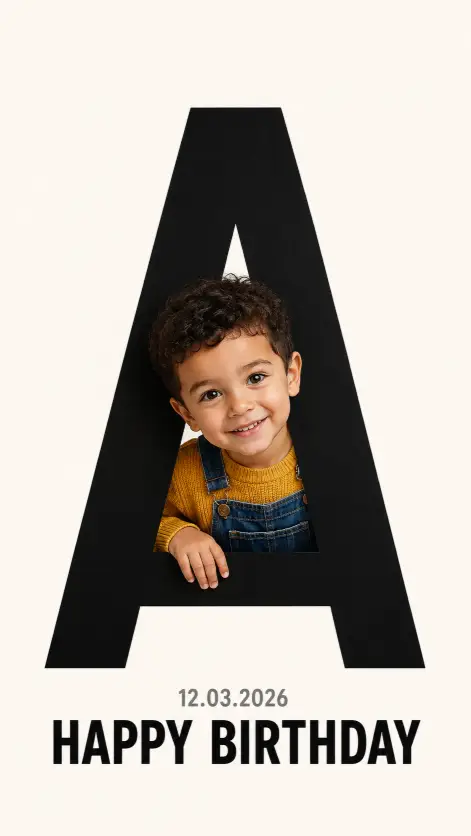
Example 1: Letter A for a Little Boy
Here’s a warm, friendly version for a boy with a March birthday. Notice how the outfit colors stay simple so the black letter still stands out.
Create a large, bold black letter “A” centered on a clean off-white background. A 4-year-old boy with short curly dark hair peeks playfully through the negative space of the letter, looking out from behind it as if emerging through a cutout. The child wears a mustard-yellow sweater and blue denim overalls and smiles warmly at the camera. One hand rests on the lower edge of the letter. Soft, even studio lighting, sharp focus on the child’s face, photorealistic, high detail. Below the letter, small gray text reads “12.03.2026” and large bold black text reads “HAPPY BIRTHDAY”. Use aspect ratio 9:16.
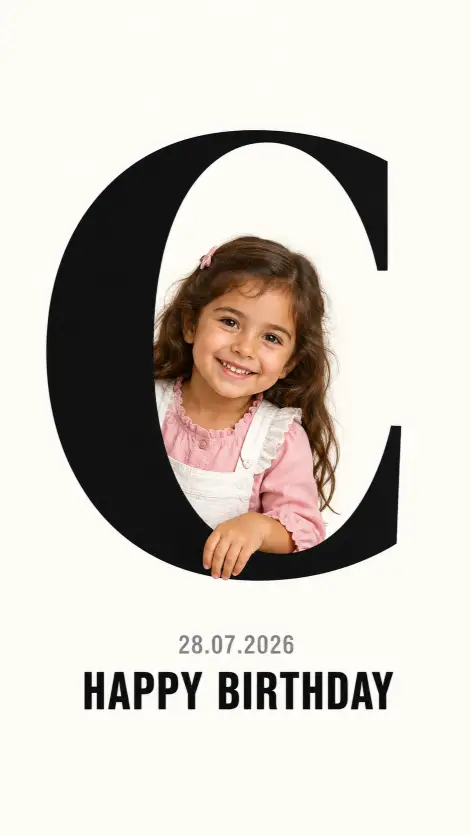
Example 2: Letter C for a Little Girl
The C is one of my favorites for this. Its wide open curve gives the child plenty of room to lean out, so the peek-through effect reads really clearly.
Create a large, bold black letter “C” centered on a clean off-white background. A 5-year-old girl with long wavy brown hair peeks playfully through the negative space of the letter, looking out from behind it as if emerging through a cutout. The child wears a pink ruffled blouse and white pinafore dress and smiles warmly at the camera. One hand rests on the lower edge of the letter. Soft, even studio lighting, sharp focus on the child’s face, photorealistic, high detail. Below the letter, small gray text reads “28.07.2026” and large bold black text reads “HAPPY BIRTHDAY”. Use aspect ratio 9:16.
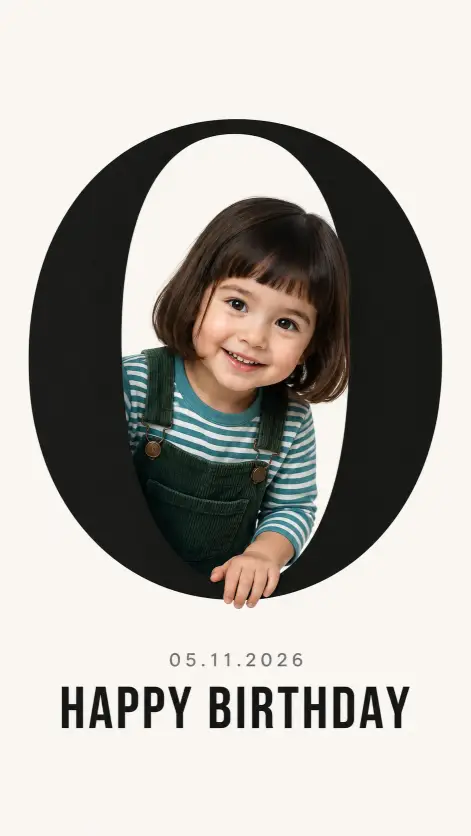
Example 3: Letter O for a Toddler
The O closes all the way around, so the child sits right in the middle hole and looks like they’re framed by the letter. Great for younger kids and toddlers.
Create a large, bold black letter “O” centered on a clean off-white background. A 3-year-old girl with a short bob haircut and bangs peeks playfully through the negative space of the letter, looking out from behind it as if emerging through a cutout. The child wears a teal striped t-shirt and dark green corduroy overalls and smiles warmly at the camera. One hand rests on the lower edge of the letter. Soft, even studio lighting, sharp focus on the child’s face, photorealistic, high detail. Below the letter, small gray text reads “05.11.2026” and large bold black text reads “HAPPY BIRTHDAY”. Use aspect ratio 9:16.
Tips to Get a Clean Result
A few small things make a big difference here.
Keep the outfit colors simple and slightly bold. A solid red, mustard, or teal pops nicely against the black letter and white background. Busy patterns tend to fight with the clean design.
If the text comes out misspelled, just regenerate. ChatGPT usually gets it right within a try or two. You can also generate the image with no text at all, then add “HAPPY BIRTHDAY” and the date yourself in Canva for total control over the font.
Want to match a specific child’s face? Upload a reference photo along with the prompt and ask ChatGPT to use that face. It does a decent job keeping the likeness while still building the letter scene around it.
Stick with the 9:16 ratio if you plan to share these as Instagram Stories or send them on WhatsApp. It fills the whole phone screen and looks like a proper card.
That’s the whole thing. One template, three working examples, and a few small tweaks to clean up the output. Once you’ve got the format down, you can spin up a birthday image for anyone in a couple of minutes.
Try it with the first letter of the birthday person’s name, drop in their real birth date, and pick an outfit color you like. If you make a nice one, I’d love to see how it turned out.